KeenComputer Research and Insight
Server Products
- Details
- By KEENCOMPUTER
- Category: Server Products
Artificial intelligence is rapidly becoming a foundational technology for businesses of all sizes. Modern enterprises are deploying AI assistants, intelligent search engines, automated software development tools, customer support agents, engineering knowledge bases, and Industrial IoT analytics platforms. Many of these solutions are powered by Large Language Models (LLMs), but organizations increasingly require systems that can operate on private data without relying on external cloud providers.
Retrieval-Augmented Generation (RAG) addresses this need by combining LLMs with enterprise knowledge repositories. Documents, manuals, CAD files, engineering drawings, maintenance records, and business policies can be indexed into vector databases, enabling AI systems to retrieve relevant information before generating responses. This approach improves factual accuracy while keeping proprietary information within organizational boundaries.
Cloud-hosted AI services offer convenience but present challenges related to recurring costs, data sovereignty, compliance, and dependence on third-party providers. These concerns are particularly significant for sectors such as healthcare, manufacturing, finance, engineering, legal services, and government.
At the same time, the used enterprise GPU market has matured. Hardware originally designed for data centers is now available at a fraction of its original cost. GPUs such as the AMD Instinct MI50 provide 32 GB of HBM2 memory and approximately 1 TB/s of memory bandwidth for around USD $150–$250, making them highly attractive for inference workloads where memory capacity and bandwidth are more important than raw graphics performance.
For organizations willing to deploy Ubuntu Linux and ROCm, these accelerators enable the creation of capable AI workstations that support quantized LLM inference, RAG pipelines, software development, and AI experimentation. Although these GPUs require active cooling and some manual configuration, they can deliver exceptional value for research and development environments.
This paper demonstrates that a carefully designed Ubuntu desktop workstation equipped with enterprise GPUs can provide an affordable, scalable platform for AI innovation. By combining open-source software with commodity PC hardware and refurbished accelerators, SMEs and research organizations can significantly reduce the cost of developing advanced AI applications.
- Details
- By KEENCOMPUTER
- Category: Server Products
Adding more memory (RAM) to your computer can significantly boost performance, especially when multitasking, running demanding applications, or handling large datasets. This white paper provides a comprehensive guide to purchasing extra memory for desktops and laptops, focusing on critical compatibility and stability considerations.
- Details
- By KEENCOMPUTER
- Category: Server Products
On-Site IT Support for Windows, Linux, and SaaS Environments
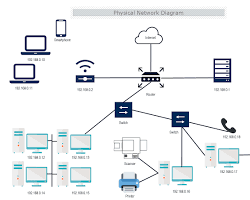
Header Image: A modern, interconnected network diagram with various devices (desktops, servers, cloud) and data flowing between them.
Introduction
In today's digital landscape, businesses of all sizes rely heavily on information technology (IT) infrastructure to operate efficiently. This infrastructure often includes a combination of on-site Windows desktop workstations, Windows and Linux servers, and cloud-based Software-as-a-Service (SaaS) applications. To ensure optimal performance, security, and reliability, organizations must invest in comprehensive IT support services.
This white paper explores the critical role of on-site IT support in managing and maintaining Windows, Linux, and SaaS environments. It will delve into the key benefits, challenges, and best practices associated with this essential service.
Benefits of On-Site IT Support
-
Proactive Maintenance: On-site IT support teams can proactively monitor and maintain your IT infrastructure, identifying and addressing potential issues before they escalate into major problems.
-
Rapid Response Times: In the event of a system failure or security breach, on-site technicians can respond quickly to minimize downtime and mitigate potential damage.
-
Deep Expertise: On-site IT professionals possess in-depth knowledge of your specific hardware, software, and network configuration, allowing them to provide tailored solutions and troubleshooting.
-
Improved Security: Regular on-site support can help ensure that your systems are adequately protected against cyber threats, including malware, ransomware, and unauthorized access.
-
Enhanced Productivity: A well-maintained IT infrastructure can significantly improve employee productivity by reducing downtime and providing reliable access to essential applications and data.
Challenges of On-Site IT Support
-
Costs: Hiring and retaining skilled IT professionals can be expensive, especially for small and medium-sized businesses.
-
Scalability: On-site IT support may struggle to scale with rapid business growth or fluctuating workloads.
-
Geographic Limitations: On-site support is typically limited to a single location, which can be challenging for organizations with multiple offices or remote workers.
Best Practices for On-Site IT Support
-
Comprehensive Service Level Agreements (SLAs): Clearly define the scope of services, response times, and performance metrics in a formal SLA to ensure accountability and satisfaction.
-
Regular Security Assessments: Conduct routine security audits to identify vulnerabilities and implement appropriate measures to protect your systems.
-
Proactive Patch Management: Stay up-to-date with software and firmware updates to address security vulnerabilities and improve performance.
-
Data Backup and Disaster Recovery Planning: Develop a robust backup strategy and disaster recovery plan to protect your critical data and ensure business continuity.
-
Remote Access and Monitoring: Implement remote access and monitoring tools to enable technicians to troubleshoot issues and provide support outside of regular business hours.
-
Staff Training and Development: Invest in ongoing training and development for your IT team to keep them up-to-date with the latest technologies and best practices.
Conclusion
On-site IT support is a vital component of a successful IT strategy for businesses of all sizes. By addressing the challenges and implementing best practices, organizations can leverage the benefits of on-site support to optimize their IT infrastructure, enhance security, and drive business growth.
References:
-
1.0 Redhat Linux Redhat.com
Note: This white paper provides a general overview of on-site IT support for Windows, Linux, and SaaS environments. Specific requirements and recommendations may vary depending on the size, industry, and unique needs of your organization. Contact keencomputer.com for details
- Details
- By KEENCOMPUTER
- Category: Server Products
A Solid-State Drive (SSD) is one of the most important upgrades for improving computer performance. Unlike traditional hard disk drives (HDDs), SSDs have no moving parts, making them significantly faster, quieter, more energy-efficient, and more resistant to physical shock.
Although SSDs require less maintenance than HDDs, proper operational maintenance can greatly improve their performance, reliability, and lifespan.
Why SSD Maintenance Matters
Proper SSD maintenance helps:
- Improve application loading times
- Increase operating system responsiveness
- Extend SSD lifespan
- Prevent data corruption
- Maintain maximum read/write performance
- Reduce unnecessary write operations
- Improve overall system reliability