For many small and medium-sized enterprises, the website is no longer simply an online brochure. It is increasingly the company's storefront, lead-generation platform, customer portal, knowledge center, marketing channel and e-commerce infrastructure.
That creates a business problem:
More marketing creates more traffic, but more traffic can expose weaknesses in the web architecture.
A successful SEO campaign, advertising campaign, social-media promotion or seasonal e-commerce event can produce a sudden increase in traffic. If every request must reach PHP, the CMS and the database, the application can become CPU-, memory- and database-intensive.
This white paper proposes a performance architecture based on Varnish Cache as a reverse caching layer, combined with an NGINX/PHP-FPM LEMP application stack and Docker-based deployment on a cloud VPS.
The central proposition is:
Performance should be treated as part of the marketing infrastructure, not merely as an IT optimization.
Varnish Cache for High-Performance CMS Web Portals and E-Commerce-LEMP, Docker and Cloud VPS Architecture for Performance, SEO and SME Marketing Growth -Research White Paper
Audience: SME Owners, Marketing Managers, CTOs, IT Managers, Web Developers and Digital Transformation Teams
Technology Focus: Varnish Cache, NGINX, PHP-FPM, MariaDB/MySQL, Redis, Docker, Docker Compose and Cloud VPS
Application Focus: CMS Web Portals, WordPress, WooCommerce, Joomla, Magento and other PHP-based web applications
Executive Summary
For many small and medium-sized enterprises, the website is no longer simply an online brochure. It is increasingly the company's storefront, lead-generation platform, customer portal, knowledge center, marketing channel and e-commerce infrastructure.
That creates a business problem:
More marketing creates more traffic, but more traffic can expose weaknesses in the web architecture.
A successful SEO campaign, advertising campaign, social-media promotion or seasonal e-commerce event can produce a sudden increase in traffic. If every request must reach PHP, the CMS and the database, the application can become CPU-, memory- and database-intensive.
This white paper proposes a performance architecture based on Varnish Cache as a reverse caching layer, combined with an NGINX/PHP-FPM LEMP application stack and Docker-based deployment on a cloud VPS.
The central proposition is:
Performance should be treated as part of the marketing infrastructure, not merely as an IT optimization.
The reference book Getting Started with Varnish Cache describes Varnish as a reverse caching proxy positioned in front of web servers to cache server output and reduce application loading time. It also emphasizes that performance and scalability are different problems: performance concerns response speed, while scalability concerns maintaining acceptable performance as traffic increases.
Varnish can therefore become an important architectural component for SME websites that need to support:
- SEO-driven organic traffic
- content marketing
- lead-generation campaigns
- product catalogs
- e-commerce promotions
- CMS publishing
- customer portals
- seasonal traffic spikes
- paid advertising
- social-media campaigns
- high-volume product/category browsing
The business objective is not simply to make a website faster.
It is to create a digital growth platform capable of converting marketing traffic into measurable business value.
1. The SME Digital Growth Problem
SMEs increasingly depend on digital channels for customer acquisition.
A typical digital marketing funnel can be represented as:
Search → Website → Content/Product Page → Engagement → Lead/Cart → Conversion → Customer
Every stage depends on the website.
If the website is slow or unreliable, the marketing investment becomes less effective.
For example:
SEO investment → more visitors → more PHP requests → more database queries → higher server load → slower pages → poorer user experience → lower conversion opportunity
The result is a paradox:
The better the marketing works, the more pressure it can place on the infrastructure.
This is particularly important for SMEs because they generally have less infrastructure redundancy than large enterprises.
A cloud VPS with an appropriately designed architecture can provide a cost-effective foundation, but the application must use its resources efficiently.
2. Research Foundation: Why Caching Matters
The supplied Varnish reference describes caching as an architectural decision rather than a trick for compensating for poorly designed applications. Its central principle is essentially:
Do not recompute data when the underlying data has not changed.
The book explains that many web applications repeatedly retrieve, assemble and render data from databases and external resources. Without caching, that work can be repeated for every request. Proper caching can therefore improve efficiency and reduce infrastructure cost.
This principle is particularly relevant to CMS and e-commerce systems.
Consider a product category page:
- NGINX receives the request.
- PHP-FPM executes the application.
- The CMS loads configuration.
- The application queries the database.
- Products are retrieved.
- Pricing information is assembled.
- Templates are rendered.
- HTML is returned.
If 1,000 visitors request essentially the same public page, performing this complete process 1,000 times is inefficient.
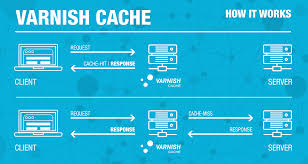
With Varnish:
First request
Client ↓ Varnish ↓ cache miss NGINX ↓ PHP-FPM ↓ Database ↓ HTML response ↓ Varnish stores response
Subsequent requests
Client ↓ Varnish ↓ cache hit HTML response
The application stack is therefore bypassed for many cacheable requests.
3. Varnish Architecture
Varnish is a reverse caching proxy.
The supplied reference describes it as software placed in front of web servers to cache server output. Varnish can listen for HTTP requests, communicate with one or more backend servers when necessary, and store HTTP response objects for subsequent requests.
A modern SME deployment can be structured as:
INTERNET │ ▼ ┌─────────────────┐ │ Cloud Firewall │ │ 80 / 443 │ └────────┬────────┘ │ ▼ ┌─────────────────┐ │ NGINX Edge │ │ TLS / HTTPS │ └────────┬────────┘ │ HTTP ▼ ┌─────────────────┐ │ Varnish Cache │ │ Reverse Proxy │ └────────┬────────┘ │ Cache Miss │ ▼ ┌─────────────────┐ │ NGINX Backend │ │ LEMP Web Server │ └────────┬────────┘ │ ▼ ┌─────────────────┐ │ PHP-FPM │ └────────┬────────┘ │ ┌───────────┴──────────┐ ▼ ▼ ┌──────────────┐ ┌──────────────┐ │ MariaDB/MySQL│ │ Redis │ └──────────────┘ └──────────────┘
NGINX officially supports static content serving, reverse proxying, caching and FastCGI/PHP application integration. (Nginx)
4. Varnish Is Not a Replacement for NGINX
A common architectural mistake is to view Varnish and NGINX as competing technologies.
They have different responsibilities.
|
Component |
Primary Responsibility |
|---|---|
|
NGINX Edge |
HTTPS termination, routing and edge web traffic |
|
Varnish |
HTTP response caching |
|
NGINX Backend |
Web-server/application gateway |
|
PHP-FPM |
PHP application execution |
|
CMS |
Business/content logic |
|
MariaDB/MySQL |
Persistent relational data |
|
Redis |
Object/session/cache support |
|
Docker |
Service isolation and deployment |
|
VPS |
Cloud infrastructure |
NGINX can itself perform caching and reverse proxying, but Varnish provides a specialized HTTP caching layer with VCL-based cache control. NGINX's official documentation also supports FastCGI communication with PHP applications. (Nginx)
The architecture should therefore be designed according to business requirements rather than simply adding technologies.
5. Varnish Configuration Language
One of the major strengths of Varnish is Varnish Configuration Language (VCL).
The supplied reference describes VCL as a domain-specific language that provides hooks into Varnish's request-processing state machine.
This enables developers to implement policies such as:
- cache public pages
- bypass administration pages
- bypass customer sessions
- bypass checkout
- bypass shopping carts
- remove unnecessary tracking cookies
- control TTL
- select backends
- implement purge/ban strategies
- handle cache variations
- support application-specific rules
This is particularly important for e-commerce.
6. What Should Be Cached?
A useful SME caching policy divides web requests into three groups.
6.1 Highly Cacheable
Examples:
- home page
- category pages
- product information pages
- articles
- blog posts
- documentation
- landing pages
- public CMS pages
These pages are often requested by many users and can provide excellent cache-hit opportunities.
6.2 Conditionally Cacheable
Examples:
- multilingual pages
- personalized content
- location-sensitive content
- pages containing selected dynamic components
- campaign landing pages
These require carefully designed cache variations.
The reference specifically warns that cache variations matter for multilingual sites and other requests where headers such as Accept-Language affect the generated response.
6.3 Normally Bypassed
Examples:
- /admin
- /wp-admin
- login
- customer account
- checkout
- cart
- payment
- authenticated API requests
- highly personalized content
Varnish's HTTP-oriented model generally caches idempotent GET/HEAD traffic, while state-changing methods such as POST, PUT and DELETE are not cached.
This distinction is essential for e-commerce security and correctness.
7. Cookies and E-Commerce
Cookies are one of the most important complications in Varnish deployment.
The reference explains that authorization headers and cookies indicate user-specific state, which can make responses unsafe to share between users.
An e-commerce architecture therefore needs to distinguish between:
PUBLIC REQUEST │ ├── Product page ├── Category ├── CMS content └── Landing page │ ▼ CACHEABLE
and:
PERSONALIZED REQUEST │ ├── Cart ├── Checkout ├── Customer account ├── Payment └── Authenticated API │ ▼ BYPASS CACHE
This is one reason Varnish implementation should be treated as an application architecture project rather than simply installing a package.
8. Cache-Control and TTL
Cache lifetime is controlled through HTTP caching semantics and VCL.
The supplied reference identifies the priority used by Varnish when determining TTL:
- VCL beresp.ttl
- s-maxage
- max-age
- Expires
- fallback TTL
For example:
Cache-Control: public, max-age=3600, s-maxage=86400
can distinguish browser caching from shared proxy caching.
For an SME website, different content classes can use different policies.
|
Content |
Example TTL |
|---|---|
|
Frequently changing home page |
1–10 min |
|
Blog article |
1–24 hours |
|
Product page |
5–60 min |
|
Category page |
5–30 min |
|
Static marketing landing page |
1–24 hours |
|
CSS/JS with versioning |
Long TTL |
|
Cart |
Bypass |
|
Checkout |
Bypass |
|
Customer account |
Bypass |
These are design starting points, not universal production values. Actual TTLs should be determined through application testing.
9. Cache Invalidation: The Critical E-Commerce Problem
Caching creates a fundamental question:
What happens when the underlying content changes?
The supplied Varnish reference emphasizes that cache invalidation can be difficult because one piece of content may appear in many locations.
For example, changing one product can affect:
- product page
- category page
- home page
- search result
- API
- product feed
- multilingual pages
This is especially important for Magento, WooCommerce and other e-commerce platforms.
A robust architecture should therefore support:
CMS Update ↓ Application Event ↓ Cache Invalidation ↓ Affected URLs / Tags ↓ Varnish ↓ Fresh Content
The reference discusses purge, ban, force-refresh and surrogate-key approaches, and notes that frameworks such as WordPress and Magento have ecosystem support for cache invalidation.
10. CMS Use Case: WordPress
WordPress is frequently used by SMEs for:
- corporate websites
- blogs
- knowledge portals
- marketing websites
- lead-generation sites
- membership portals
- publishing platforms
A typical architecture is:
Internet ↓ NGINX ↓ Varnish ↓ NGINX ↓ PHP-FPM ↓ WordPress ↓ MariaDB
Varnish is particularly valuable when the site has a high proportion of anonymous visitors consuming public content.
The reference explicitly identifies WordPress as one of the open-source platforms with Varnish support and ecosystem tooling for invalidation.
11. WooCommerce Use Case
WooCommerce introduces additional complexity because the website contains both public and personalized traffic.
Potentially cacheable:
- product pages
- categories
- product collections
- brand pages
- editorial content
- public landing pages
Normally bypassed:
- cart
- checkout
- customer account
- payment
- personalized API calls
The goal is therefore not:
"Cache everything."
The goal is:
Cache the maximum amount of safe public content while preserving transactional correctness.
12. Joomla Use Case
Joomla can use Varnish as an additional HTTP caching layer for:
- corporate portals
- government-style information portals
- association websites
- educational portals
- knowledge bases
- public content websites
- multilingual websites
A Joomla deployment should carefully distinguish:
Public Articles Public Categories Public Menus Public Landing Pages ↓ CACHE
from:
Administrator Authenticated User Personalized Content Forms Sessions ↓ BYPASS
Multilingual implementations require special attention to cache variation because language selection can change the response. The Varnish reference specifically highlights Vary handling for language-dependent responses.
13. Magento Use Case
Magento is a particularly strong use case for Varnish because e-commerce catalogs can generate substantial application and database activity.
Typical public requests include:
- home page
- category page
- product page
- search results
- CMS pages
- promotional landing pages
Transactional requests include:
- cart
- checkout
- customer dashboard
- payment
- order processing
Magento's architecture therefore benefits from separating:
Cacheable catalog traffic
from
dynamic transactional traffic.
The supplied Varnish reference specifically identifies Magento as a framework with Varnish ecosystem support and cache-invalidation mechanisms.
14. E-Commerce Traffic Model
Consider an SME online store receiving:
10,000 requests/day
Suppose a large percentage of requests are public catalog pages.
Without HTTP caching:
10,000 requests ↓ 10,000 application executions ↓ Thousands of database operations
With Varnish:
10,000 HTTP requests ↓ Varnish │ ├── 8,000 cache hits │ └── 2,000 cache misses ↓ Application
The numbers are illustrative, not a performance guarantee.
The important concept is cache-hit ratio.
If 80% of requests can safely be served from cache, the backend may avoid processing a substantial portion of the traffic.
15. Varnish and Database Efficiency
A CMS frequently spends resources on:
- database queries
- PHP execution
- template rendering
- API calls
- object creation
- serialization
- external services
Varnish can prevent many of these operations from occurring for cache hits.
Redis can address a different layer:
Varnish ↓ HTTP response cache Redis ↓ Object/session/application cache MariaDB/MySQL ↓ Persistent relational database
These technologies are complementary rather than interchangeable.
16. LEMP Architecture for a Cloud VPS
A practical SME cloud deployment can use:
L — Linux
E — NGINX
M — MariaDB/MySQL
P — PHP-FPM
with Varnish and Redis added as performance services.
A production-oriented architecture can therefore be:
INTERNET │ ▼ ┌─────────────────┐ │ Cloud Firewall │ └────────┬────────┘ │ HTTPS / HTTP │ ▼ ┌─────────────────┐ │ NGINX Edge │ │ TLS termination │ └────────┬────────┘ │ ▼ ┌─────────────────┐ │ Varnish │ │ HTTP Cache │ └────────┬────────┘ │ ▼ ┌─────────────────┐ │ NGINX App │ └────────┬────────┘ │ ▼ ┌─────────────────┐ │ PHP-FPM │ └───────┬─────────┘ │ ┌───────┴────────┐ ▼ ▼ ┌──────────┐ ┌──────────┐ │ MariaDB │ │ Redis │ └──────────┘ └──────────┘
NGINX officially supports FastCGI application routing and PHP-FPM integration. (Nginx)
17. Docker Development Architecture
Docker Compose is particularly useful for developing this architecture because the application can be represented as a collection of services.
Docker describes Compose as a tool for defining and running multi-container applications and notes that the same Compose configuration can support development, testing, CI, staging and production workflows. (Docker Documentation)
A development stack might contain:
nginx varnish php mariadb redis wordpress / joomla / magento
For Magento, additional services such as OpenSearch can be added.
18. Example Docker Compose Architecture
The following is a reference development architecture rather than a drop-in production configuration.
services: edge: image: nginx:alpine ports: - "80:80" - "443:443" volumes: - ./docker/nginx/edge.conf:/etc/nginx/conf.d/default.conf:ro - ./docker/certs:/etc/nginx/certs:ro depends_on: - varnish networks: - frontend varnish: image: varnish:stable command: - "-F" - "-f" - "/etc/varnish/default.vcl" - "-a" - ":80" - "-s" - "malloc,256m" volumes: - ./docker/varnish/default.vcl:/etc/varnish/default.vcl:ro depends_on: - app-nginx networks: - frontend - backend app-nginx: image: nginx:alpine volumes: - ./app:/var/www/html - ./docker/nginx/app.conf:/etc/nginx/conf.d/default.conf:ro depends_on: - php networks: - backend php: image: php:8.3-fpm volumes: - ./app:/var/www/html depends_on: - db - redis networks: - backend db: image: mariadb:11 environment: MYSQL_DATABASE: cms MYSQL_USER: cms MYSQL_PASSWORD: change-me MYSQL_ROOT_PASSWORD: change-root-password volumes: - dbdata:/var/lib/mysql networks: - backend redis: image: redis:alpine volumes: - redisdata:/data networks: - backend networks: frontend: backend: volumes: dbdata: redisdata:
For production, secrets, credentials, TLS certificates, persistent storage, backup strategy and version pinning should be handled properly rather than using development values.
Docker's production guidance recommends production-specific Compose configuration, appropriate restart policies, environment settings and deployment-specific changes. (Docker Documentation)
19. Example Varnish VCL
A simplified conceptual VCL policy might look like:
vcl 4.1; backend default { .host = "app-nginx"; .port = "80"; } sub vcl_recv { # Never cache administrative interfaces if (req.url ~ "^/admin") { return (pass); } # Never cache transactional requests if (req.method != "GET" && req.method != "HEAD") { return (pass); } # Bypass common session-sensitive areas if (req.url ~ "^/(cart|checkout|account)") { return (pass); } # Bypass authenticated traffic if (req.http.Authorization) { return (pass); } return (hash); } sub vcl_backend_response { # Example default cache lifetime set beresp.ttl = 10m; # Do not cache explicitly private content if (beresp.http.Cache-Control ~ "private") { set beresp.uncacheable = true; set beresp.ttl = 0s; return (deliver); } return (deliver); }
This should not be deployed unchanged to Magento, WooCommerce, Joomla or WordPress.
Each application requires application-specific rules.
The Varnish reference stresses that VCL is powerful precisely because it allows developers to customize behavior through request-processing hooks.
20. HTTPS and TLS Architecture
A common architecture is:
HTTPS ↓ NGINX ↓ TLS termination HTTP ↓ Varnish ↓ NGINX
The supplied reference explains that Varnish historically leaves TLS termination to another component and describes TLS-offloading architectures using proxies such as HAProxy or dedicated TLS proxies.
For an SME VPS, NGINX can therefore provide the HTTPS entry point while Varnish concentrates on HTTP caching.
21. Cloud VPS Deployment Model
A practical deployment pipeline is:
Developer Workstation │ ▼ Git Repository │ ▼ Docker Build │ ▼ Automated Tests │ ▼ Staging VPS │ ▼ Performance Tests │ ▼ Production VPS │ ▼ Monitoring
The same architecture can be reproduced between environments.
This reduces configuration drift.
Docker Compose's production documentation specifically describes using Compose configurations across development, CI, staging and production and recommends production-specific overrides. (Docker Documentation)
22. Recommended VPS Production Structure
A small SME VPS might use:
Ubuntu LTS │ ├── Docker Engine │ ├── Docker Compose │ ├── NGINX │ ├── Varnish │ ├── PHP-FPM │ ├── MariaDB/MySQL │ ├── Redis │ └── CMS / E-Commerce Application
For larger workloads:
Internet │ ▼ CDN / WAF │ ▼ Load Balancer │ ├── VPS 1 ├── VPS 2 └── VPS 3 │ ▼ Varnish │ ▼ Application
NGINX supports HTTP load balancing among multiple application servers, including round-robin configurations. (Nginx)
23. Development → Staging → Production
A disciplined SME deployment should have at least three environments.
Development
Purpose:
- feature development
- VCL development
- CMS configuration
- plugin testing
- integration testing
Staging
Purpose:
- production-like configuration
- cache testing
- SEO testing
- performance testing
- security testing
- deployment validation
Production
Purpose:
- customer traffic
- marketing campaigns
- e-commerce transactions
- monitoring
- backups
- disaster recovery
The key principle is:
Do not experiment with Varnish configuration directly on the production site.
24. Performance Testing Strategy
Performance should be measured before and after Varnish.
Recommended metrics include:
|
Metric |
Business Relevance |
|---|---|
|
TTFB |
Server responsiveness |
|
LCP |
User-perceived loading |
|
Cache-hit ratio |
Caching effectiveness |
|
Requests/sec |
Capacity |
|
CPU utilization |
VPS efficiency |
|
RAM utilization |
Resource efficiency |
|
PHP execution time |
Application efficiency |
|
Database load |
Backend pressure |
|
Error rate |
Reliability |
|
Conversion rate |
Marketing effectiveness |
Varnish provides operational tooling such as statistics and logs; the supplied reference discusses varnishlog, varnishtop and varnishstat as mechanisms for measurement and debugging.
25. SEO Value of Performance
SEO is not simply keyword placement.
A modern SEO program depends on:
- crawlability
- indexability
- content quality
- technical architecture
- mobile usability
- structured data
- internal linking
- page experience
- site performance
The Varnish reference notes the relationship between web performance, user experience and search visibility and states that Google considers loading performance in ranking.
However, SMEs should avoid treating caching as an SEO shortcut.
A fast site does not automatically rank.
Rather:
Performance is an enabling component of technical SEO and user experience.
26. SEO + Varnish = Marketing Infrastructure
The relationship can be represented as:
SEO Content ↓ Organic Search ↓ Website Visit ↓ Fast Response ↓ Better User Experience ↓ Engagement ↓ Lead / Purchase ↓ Revenue
Caching supports the middle of this chain.
It does not replace:
- keyword research
- content strategy
- technical SEO
- link development
- structured data
- conversion optimization
- product strategy
Instead, it strengthens the infrastructure that delivers the marketing experience.
27. AIDA Marketing Strategy
The white paper's marketing strategy can be organized around the AIDA model:
Attention
Create attention around the business problem:
"Is your website fast enough to survive your next successful marketing campaign?"
This reframes performance from a technical concern into a business-risk question.
Interest
Educate the prospect about:
- reverse caching
- Varnish
- LEMP
- Docker
- VPS architecture
- cache-hit ratios
- application performance
- SEO
- e-commerce scalability
The prospect begins to understand the problem.
Desire
Connect technology to business outcomes:
- faster customer experience
- greater campaign resilience
- more efficient VPS resources
- better scalability
- improved technical SEO foundation
- better e-commerce performance
- lower infrastructure pressure
- improved marketing ROI potential
Action
The final stage should provide a practical path:
Website Performance Assessment → Architecture Review → Development/Staging → Varnish Implementation → Performance Testing → Production Deployment → SEO/Marketing Optimization
The objective is to transform a technical discussion into a business development opportunity.
28. Educational Marketing for SMEs
Technical marketing should not begin with:
"Buy Varnish."
Instead, it should educate the SME owner.
The conversation should be:
Problem
"Your marketing campaign increases traffic."
Explanation
"Your CMS may execute PHP and database operations for every public page request."
Solution
"Reverse caching can serve repeated public content without repeatedly executing the application."
Architecture
"Varnish can sit between the public-facing web layer and the application."
Business value
"This can reduce backend workload and improve the ability of the site to handle traffic."
Action
"Let's measure your current architecture and determine whether Varnish is appropriate."
This approach creates trust because the customer understands the technology before being asked to purchase it.
29. SME Marketing Value Proposition
The technology can be translated into a business value chain:
|
Technical Capability |
SME Marketing Value |
|---|---|
|
Varnish |
Faster public content delivery |
|
NGINX |
Efficient web traffic handling |
|
PHP-FPM |
Application execution |
|
Redis |
Application/session/object caching |
|
Docker |
Repeatable deployment |
|
VPS |
Cost-controlled cloud infrastructure |
|
SEO |
Organic customer acquisition |
|
Content Marketing |
Education and trust |
|
Analytics |
Measurable marketing |
|
Performance Monitoring |
Continuous optimization |
The key business proposition is:
Build a website that can support the marketing strategy rather than allowing infrastructure limitations to constrain growth.
30. Marketing Campaign Scenario
Consider an SME launching a new product.
Phase 1 — SEO
The company publishes:
- product guides
- comparison articles
- tutorials
- FAQ pages
- case studies
- product pages
Phase 2 — Content Marketing
The company distributes content through:
- social media
- newsletters
- partner websites
Phase 3 — Search Traffic
Google begins generating organic traffic.
Phase 4 — Campaign
The company launches paid advertising.
Traffic increases sharply.
Phase 5 — Infrastructure
Varnish serves cacheable public pages.
The application processes requests that genuinely require dynamic computation.
Phase 6 — Conversion
Customers can:
- browse products
- read information
- submit forms
- add products to carts
- complete transactions
The architecture therefore connects:
Marketing → Infrastructure → Customer Experience → Conversion
31. Varnish and Marketing Campaign Resilience
The supplied Varnish reference makes an important observation: a successful marketing campaign can expose scalability problems that are not visible under ordinary traffic.
This leads to a useful SME principle:
Infrastructure should be designed for successful marketing, not average traffic.
An SME should therefore test:
- campaign landing pages
- product pages
- category pages
- high-traffic articles
- promotional pages
before major campaigns.
32. Cost Efficiency for SMEs
Varnish can potentially improve infrastructure efficiency because cache hits can avoid application processing.
The reference emphasizes that caching can increase efficiency and reduce infrastructure cost when used as an architectural strategy.
For SMEs, the value can be significant because the company may be able to delay infrastructure expansion.
Instead of immediately moving from:
1 VPS
to:
5 application servers
the organization can first investigate:
- caching
- database optimization
- Redis
- PHP-FPM tuning
- image optimization
- CDN
- application optimization
Caching is therefore one component of a broader performance engineering strategy.
33. Varnish Is Not a Silver Bullet
The supplied reference explicitly cautions that Varnish is only one component of the stack. Network, operating system, web server and application runtime can still become bottlenecks.
Therefore:
Varnish + NGINX + PHP-FPM + Redis + Database + Application Optimization + Cloud Infrastructure
must be considered together.
34. Security Considerations
Performance architecture must not compromise security.
Recommended controls include:
- HTTPS
- firewall
- SSH key authentication
- restricted administrative access
- Docker image updates
- CMS/plugin updates
- database backups
- secrets management
- monitoring
- rate limiting
- WAF/CDN where appropriate
- administrative endpoint protection
Varnish should never be treated as a security boundary by itself.
35. Backup and Disaster Recovery
Caching is disposable.
Database data is not.
A production architecture should therefore prioritize:
Application Code ↓ Version Control Database ↓ Automated Backups Media ↓ Off-site Backup Configuration ↓ Version Controlled Infrastructure
If Varnish cache is lost, the application should be able to rebuild the cache.
If the database is lost, the business may be lost.
36. Cache Monitoring
A production dashboard should monitor:
Varnish
- hit rate
- miss rate
- hit-for-pass
- object count
- cache size
- backend response time
NGINX
- requests/sec
- active connections
- HTTP errors
- upstream latency
PHP-FPM
- active workers
- idle workers
- queue depth
- slow requests
Database
- connections
- query latency
- CPU
- memory
- disk I/O
VPS
- CPU
- RAM
- disk
- network
- load average
Business
- sessions
- leads
- cart additions
- conversions
- revenue
This final category is crucial.
A technically excellent cache is not necessarily a business success.
37. Performance KPI → Marketing KPI
A mature SME should connect technical metrics with business metrics.
Cache Hit Ratio ↓ Backend Load ↓ TTFB ↓ Page Experience ↓ Engagement ↓ Conversion ↓ Revenue
This creates a management-level performance model.
Instead of reporting:
"Varnish has an 85% hit rate."
the technology team should eventually be able to say:
"Caching reduced backend load during the campaign and helped maintain acceptable page response times while traffic increased."
38. SEO Content Strategy for the SME
A performance-focused SME content program can be built around five content pillars.
Pillar 1 — Educational
Examples:
- Why is my WordPress website slow?
- What is Varnish Cache?
- What is a LEMP stack?
- What is Docker?
- How does website caching work?
Pillar 2 — Commercial
Examples:
- Managed WordPress performance optimization
- Magento performance optimization
- WooCommerce optimization
- Joomla performance engineering
- VPS migration services
Pillar 3 — Problem/Solution
Examples:
- How to survive a traffic spike
- How to reduce PHP server load
- How to optimize a slow e-commerce store
Pillar 4 — Research
Examples:
- Varnish versus CDN
- VPS versus managed hosting
- Docker versus traditional deployment
Pillar 5 — Case Studies
Examples:
- Before/after performance
- Campaign traffic analysis
- E-commerce scaling
- CMS migration
39. SEO Keyword Architecture
Rather than targeting only high-volume generic keywords, an SME can build keyword clusters around buyer intent.
Informational
- what is Varnish Cache
- Varnish Cache tutorial
- reverse proxy caching
- website caching explained
- LEMP stack explained
Problem-oriented
- slow WordPress website
- slow WooCommerce website
- slow Magento store
- Joomla performance optimization
- PHP website slow
Commercial
- Varnish Cache consulting
- Magento performance optimization
- WordPress performance optimization
- WooCommerce optimization services
- Joomla performance services
Transactional
- VPS migration service
- managed WordPress VPS
- Magento VPS hosting
- Docker VPS deployment
- website performance audit
This creates a funnel from education to commercial intent.
40. SME Digital Transformation Model
The complete business model can be represented as:
SME BUSINESS │ ┌──────────┴──────────┐ │ │ MARKETING TECHNOLOGY │ │ SEO / Content LEMP / Docker │ │ Social / Email Varnish │ │ Traffic VPS Cloud │ │ └──────────┬──────────┘ │ DIGITAL EXPERIENCE │ ┌───────┴───────┐ │ │ Leads E-Commerce │ │ └───────┬───────┘ │ Revenue
The important conclusion is that marketing and infrastructure should not be managed as isolated departments.
41. Recommended SME Implementation Roadmap
Phase 1 — Assessment
- Measure current TTFB
- Measure Core Web Vitals
- Identify slow pages
- Analyze PHP workload
- Analyze database workload
- Identify cacheable URLs
- Identify session-dependent URLs
- Review SEO architecture
- Review VPS capacity
Phase 2 — Development
- Build Docker Compose environment
- Add NGINX
- Add PHP-FPM
- Add database
- Add Redis
- Add Varnish
- Create VCL
- Test cache behavior
Phase 3 — CMS Integration
- Configure WordPress/Joomla/Magento
- Configure WooCommerce where applicable
- Identify administrative paths
- Identify transactional paths
- Configure cache invalidation
- Test cookies
- Test multilingual behavior
Phase 4 — Performance Testing
- Baseline without Varnish
- Test with Varnish
- Test cache-hit ratio
- Test traffic spikes
- Test cache invalidation
- Test login
- Test cart
- Test checkout
- Test publishing workflow
Phase 5 — Production
- Deploy cloud VPS
- Configure firewall
- Configure HTTPS
- Deploy Docker Compose
- Configure monitoring
- Configure backups
- Deploy application
- Warm/test cache
- Monitor production
Phase 6 — Marketing
- Technical SEO
- Keyword research
- Content production
- Landing pages
- Email marketing
- Social campaigns
- Analytics
- Conversion optimization
42. Recommended Architecture by Business Size
|
SME Situation |
Recommended Architecture |
|---|---|
|
Small brochure site |
NGINX + PHP |
|
Growing CMS |
NGINX + PHP + Redis |
|
High-traffic CMS |
NGINX + Varnish + PHP + Redis |
|
WooCommerce |
NGINX + Varnish + PHP + Redis + DB |
|
Magento |
NGINX + Varnish + PHP + Redis + DB + search service |
|
Major campaigns |
CDN/WAF + Varnish + multiple application nodes |
|
Enterprise-scale |
CDN + WAF + load balancer + Varnish + application cluster |
Not every SME needs Varnish.
The correct question is:
Does the application's traffic profile justify a reverse caching layer?
43. Strategic Role of Varnish in SME Marketing
Varnish should be viewed as part of a broader digital-growth architecture.
IT Perspective
Varnish:
- reduces backend requests
- improves scalability
- provides configurable HTTP caching
- supports traffic bursts
- reduces repetitive computation
Marketing Perspective
The resulting infrastructure can help support:
- SEO traffic
- content marketing
- advertising campaigns
- product launches
- email campaigns
- social campaigns
Business Perspective
The ultimate objectives are:
- better customer experience
- more reliable digital operations
- improved infrastructure efficiency
- increased campaign resilience
- stronger conversion opportunities
- improved return on digital investment
44. The SME Performance Flywheel
A mature digital SME can create a continuous improvement cycle:
CONTENT ↓ SEO ↓ TRAFFIC ↓ PERFORMANCE ↓ USER EXPERIENCE ↓ CONVERSION ↓ ANALYTICS ↓ OPTIMIZATION ↓ BETTER CONTENT ↓ MORE TRAFFIC
Varnish sits in the performance layer of this flywheel.
It does not create demand.
It helps the infrastructure respond to demand.
45. Conclusion
Varnish Cache should not be considered merely a performance plugin or an emergency solution for an overloaded server.
The research material supplied for this paper presents a stronger architectural concept: caching should be treated as a deliberate component of web architecture. Varnish is designed as a reverse caching proxy, and its VCL model provides developers with fine-grained control over HTTP caching behavior.
For SMEs operating WordPress, WooCommerce, Joomla, Magento and other CMS/e-commerce systems, the architecture can be particularly valuable when substantial traffic consists of repeatable public content.
The recommended architecture is:
CLOUD VPS │ Docker Compose │ ┌──────────────┴──────────────┐ │ │ NGINX Varnish │ │ └──────────────┬──────────────┘ │ PHP-FPM │ ┌────────┴────────┐ │ │ MariaDB Redis │ │ └────────┬────────┘ │ CMS / E-Commerce │ ┌──────────────┴──────────────┐ │ │ SEO Marketing │ │ └──────────────┬──────────────┘ │ CUSTOMER TRAFFIC │ LEADS / SALES
The business case is therefore larger than "make the website faster."
The strategic proposition is:
Build an infrastructure platform capable of turning SEO, content marketing and e-commerce traffic into a reliable digital customer experience.
For SMEs, this creates an opportunity to combine technical performance engineering, cloud infrastructure, SEO, content marketing and conversion optimization into one integrated digital-transformation program.
46. Recommended SME Service Model
A technology and digital-marketing provider can package this capability into five services.
1. Website Performance Assessment
Measure:
- TTFB
- Core Web Vitals
- PHP performance
- database performance
- cacheability
- VPS capacity
2. Varnish Architecture
Design:
- VCL
- cache policy
- cache invalidation
- cookie handling
- CMS integration
- e-commerce bypass rules
3. Cloud VPS Modernization
Implement:
- Linux
- NGINX
- Docker
- Docker Compose
- PHP-FPM
- Redis
- MariaDB/MySQL
- monitoring
- backups
4. SEO and Content Marketing
Develop:
- keyword strategy
- educational content
- landing pages
- technical SEO
- content clusters
- conversion paths
5. Continuous Optimization
Measure:
Traffic ↓ Performance ↓ Engagement ↓ Leads ↓ Sales ↓ ROI
and continuously improve the complete system.
47. Final Strategic Recommendation
For an SME, the recommended mindset is:
Do not ask only:
"How can we make our website faster?"
Ask:
"How can we build a digital platform that remains fast, reliable and commercially effective when our marketing succeeds?"
That question leads naturally toward:
SEO + Content + AIDA Marketing + LEMP + Docker + Varnish + Redis + Cloud VPS + Monitoring + Conversion Optimization.
This integrated approach turns website infrastructure from a technical cost center into a potential SME growth-enablement platform.
Source and Research Notes
The primary technical foundation for the Varnish discussion in this white paper is Thijs Feryn's Getting Started with Varnish Cache: Accelerate Your Web Applications, supplied with this project. The source covers Varnish architecture, HTTP caching, VCL, cookies, cache variations, TTL, conditional requests, invalidation, backend selection and business use cases.
Current infrastructure guidance was additionally cross-checked against official NGINX and Docker documentation. NGINX documents its role as an HTTP server, reverse proxy, cache and load balancer and documents FastCGI/PHP integration. (Nginx) Docker documents Compose as a multi-container application management system and provides specific guidance for production deployments and production Compose overrides. (Docker Documentation)
Important: Performance figures in this paper that are presented as examples—such as hypothetical cache-hit ratios or request distributions—are illustrative engineering scenarios, not guaranteed results. Production performance should be established through benchmarking and monitoring of the specific CMS, e-commerce application, VPS and traffic profile.